Get started with Particle Life
Basic goal
This example gets you familiar with using a coding assistant to drive Artemis. The assistant will use the Artemis skills and CLI to import a ready-made C++ project, start a Discovery optimisation run, and inspect what it found.
The assistant can carry out most of the workflow, but you remain in control. You provide credentials and make account-level choices, while the assistant explains and verifies each stage. The commands are included so that you can follow what it is doing and reuse the process for your own project.
Machine prerequisites
The machine that will run Particle Life needs:
- CMake 3.16 or newer, including
ctest; - a C++17 compiler; and
- Python 3.
The walkthrough below guides you through Artemis authentication, Git access, and bringing the runner online.
What you and your assistant will have done
By the end of the example, you and your assistant will have:
- loaded the Artemis skills into your coding assistant;
- installed and authenticated the Artemis CLI;
- brought a compatible runner online;
- imported Particle Life at a known revision;
- run Discovery against the
simulation_fpsbenchmark; and - compared the baseline with the best candidate and inspected what changed.
You should also understand which inputs—repository, commands, metric, task, runner, model, and version budget—you would replace for your own project.
What this example does not cover
- Writing a benchmark harness or making an arbitrary repository Artemis-ready. Particle Life already provides compile, test, and benchmark commands. For that workflow, see Make a repository ready.
- Validating commands on a specialised target runner when local and remote environments differ, for example when a project requires dependencies on a remote machine. For that workflow, see Verifying commands on a runner.
Those are important steps for many real projects, but this example deliberately starts with an Artemis-ready repository.
What is Particle Life?
Particle Life is a deterministic C++17 simulation in which five species of particles move in a toroidal 2D world according to fixed interaction rules. A checksum-based test pins the simulation behaviour, so making it faster must not change the physics.
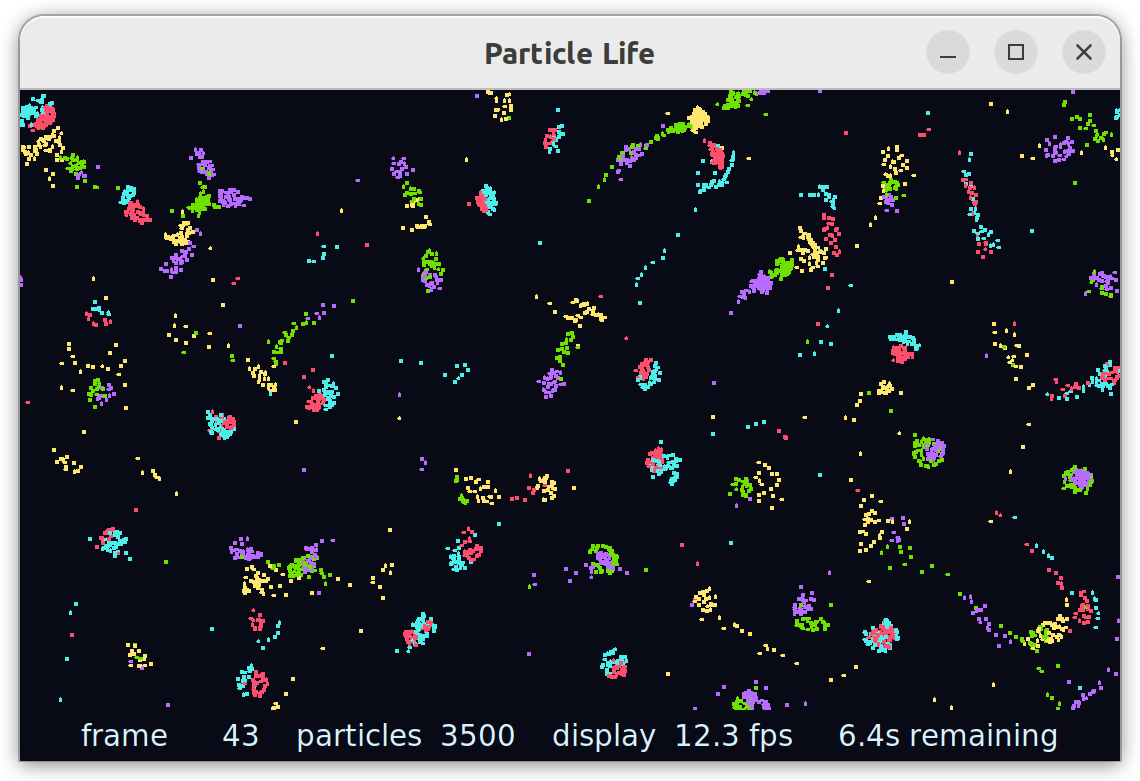
The repository ships an optional Tk renderer, shown above.
python3 tools/window_renderer.py --duration 10
The seed implementation checks every pair of particles in Simulation::step(), an O(N²) operation, even though forces only act within a fixed radius. This gives Discovery a clear optimisation problem and simulation_fps gives it a numeric metric to maximise.
Let's begin
1. Install the skills
You or the assistant can follow Artemis Skills to install or load the skills for your assistant host. Finish this before the assistant sets up the CLI or runs Discovery: the skills tell it how to carry out and verify each stage.
If the host requires a session reload, that is a human action. For example, after installing the Claude Code plugin, run /reload-plugins and then verify the installation with /plugin list.
Checkpoint: the assistant can access the Artemis skills, including cli-setup, runner-setup, project-import, discovery-start, and discovery-inspect.
2. Complete the prerequisites
Ask the assistant to use the relevant skill for each item and explain the result. Stop at any human-only action rather than pasting credentials into the conversation.
-
Install and authenticate the CLI (
cli-setup)- The assistant can install the CLI and check its configuration.
- You must create an Artemis API key in the web UI and enter it in your own terminal.
- Checkpoint:
artemis statusreportsStatus: okfor Configuration and Authentication. The service probes may sayok reachable (HTTP 404); that is healthy.
-
Connect a Git provider and identify a Git key
- You must connect a provider in the Artemis web UI if your account does not already have one.
- The assistant can run
artemis key listand record the key ID. A key ID is required for import even though Particle Life is public. - Checkpoint:
artemis key listreturns at least one key ID.
-
Set up a runner (
runner-setup)- The assistant or a human can install and start the runner.
- Confirm that
cmake,ctest, the C++17 compiler, andpython3are all available on the runner'sPATH. - Start it with
--no-delete-task-outputif you want the assistant to inspect logs and files from failed versions later. - Checkpoint:
artemis runner listshows the chosen runner as online.
Particle Life already contains the required compile, test, and benchmark commands, so there is no repository-side setup. In particular, the benchmark must run headlessly:
python3 tools/benchmark.py --no-visualize
Run Discovery
The following steps show the skill the assistant should use, the shape of the CLI command, and the evidence that the step succeeded. Ask the assistant to work through them in order and pause whenever it needs a credential or account choice from you.
1. Confirm readiness
Skill: cli-setup and runner-setup
artemis status
artemis key list
artemis runner list
artemis model list
Use the output to select the Git key ID, runner name, and catalogue UUID for gpt-5.6-terra.
Checkpoint: authentication is healthy, a Git key exists, the runner is online, and the model is available. Do not start a run while any of these checks is unresolved.
2. Import Particle Life
Skill: project-import
artemis project import \
  --git-url https://github.com/turintech/particle-life \
  --key-id <key-id> \
  --branch main \
  --name particle-life
The public repository can be imported directly; you do not need to fork or clone it. Import is asynchronous, so the command returning only proves that it was queued. Check the project list until the imported project reports importedStatus: success:
artemis --output-format json project list
Then verify the seed revision:
artemis project compare <project-id>
The expected upstream head is:
1399caa42c2c9a473853008ceb945c0c21ad839f
If main has moved and you want to reproduce this example at the same revision, pin it before starting Discovery:
artemis project branch <project-id> --branch main \
  --sha 1399caa42c2c9a473853008ceb945c0c21ad839f
Checkpoint: import reached success and the project points at the intended revision. The assistant gives you a clickable project link:
https://artemis.turintech.ai/projects/<project-id>
3. Start the optimisation
Skill: discovery-start
artemis discovery create \
  --project <project-id> \
  --task "Maximize simulation_fps without changing simulation behavior or weakening the correctness tests." \
  --versions 10 \
  --compile-cmd "cmake -S . -B build -DCMAKE_BUILD_TYPE=Release && cmake --build build --parallel" \
  --test-cmd "ctest --test-dir build --output-on-failure" \
  --benchmark-cmd "python3 tools/benchmark.py --no-visualize" \
  --target-files src/simulation.cpp \
  --target-files src/simulation.hpp \
  --runner <runner-name> \
  --mode automatic \
  --model <gpt-5.6-terra-catalogue-uuid>
Pass each target file with its own --target-files flag. The hot loop is in src/simulation.cpp, but an algorithm such as a spatial grid may need new member state in src/simulation.hpp.
The commands are passed inline so the run records exactly how candidates were compiled, tested, and measured.
Checkpoint: the run has a non-null baselineObservationId, baselineVersionSha, and metricsSchema, and versionCount is at least 1. A finalised baseline alone does not prove that exploration started. The assistant gives you a clickable Discovery link:
https://artemis.turintech.ai/projects/<project-id>/discovery/<run-id>
4. Monitor the run
Skill: discovery-inspect
artemis discovery get <run-id>
artemis discovery versions list <run-id>
The assistant should confirm that the baseline was measured, versions were generated, and completed versions passed the supplied compile, test, and benchmark commands. Individual versions may fail; that does not make the whole run invalid.
If the run appears inactive, inspect the runner log. Gaps while the Discovery agent plans its next candidate are normal.
Checkpoint: the run reaches a terminal state and at least one candidate has a measured simulation_fps.
5. Inspect and report the result
Skill: discovery-inspect
The assistant should:
- report the baseline and best measured
simulation_fps; - account for the 10-version budget, including failed versions;
- rank candidates by
simulation_fps, not only by composite fitness; - retrieve and read the winning diff; and
- explain whether it found an algorithmic change, a smaller local optimisation, or no meaningful improvement.
Checkpoint: you know what improved, by how much on this runner, and what code produced the result.
What to expect
Discovery is a stochastic search. Different runs against the same seed can produce very different improvements, and some versions may fail during generation, compilation, or scoring.
The purpose of the example is to learn how to:
- give Discovery a measurable goal and a fixed correctness check;
- distinguish a healthy baseline from active exploration;
- interpret how the version budget was spent; and
- verify that the best metric belongs to a change you would actually accept.
Both algorithmic changes (for example a spatial grid over the O(N²) pair loop) and compiler or build-flag changes can improve simulation_fps. How large the gain is depends on the runner environment. Rank candidates by your primary metric and read the full metric set alongside the winning diff so you stay focused on that goal; confirm the checksum test remains intact. Model-judged qualitative scores are review signals, not measurements.
Have fun experimenting to see what you can find!
Optional next steps
- Verify the winner independently: pull the candidate diff, apply it to a clean checkout of the pinned seed, rebuild, run
./build/particle_life_tests, and compare checksums at another particle count. - Learn to redirect a live run: follow Steer a running discovery to steer from compiler flags to source algorithms, then expand the budget.
- Make a repository Discovery-ready: follow Make a repository ready to fork the no-benchmark lab branch, author a harness, and import your fork.
- Verify commands on a runner: follow Verifying commands on a runner to iterate commands remotely, fix a harness, and
project pullbefore Discovery. - Adapt the workflow: replace the repository URL and revision, runner environment, compile/test/benchmark commands, metric, task, target files, model, and version budget for your own project.
Troubleshooting
Use discovery-inspect and retained runner output to investigate a run with no measured versions. Check authentication, Git key, import status, runner availability, headless benchmark configuration, and model selection first. Failed individual versions are normal; a run that finishes without measuring any candidate is not.