Productionising a Spam Email Classifier
This project demonstrates how to use Artemis' Planning agent to expand a basic ML pipeline into an informed, production-grade, deployable machine learning system. In this case, we showcase this capability at the example of a spam email detection binary classification project.
1. Primary setup
We build a baseline binary classification pipeline using logistic regression to predict if an email should be marked as spam based on word frequency features. The implementation is comprised of the following components:
a) Dataset: an open-source Kaggle dataset, containing 5172 emails, each represented by 3,000 numeric features corresponding to word occurence frequencies, along with a binary target variable (1 for spam, 0 for legitimate email)
b) Data Preparation: we perform a 80/20 stratified train-test split to preserve class distribution while allocating sufficient data for model evaluation.
c) Model Training, Validation and Storage: we train a logistic regresson classifier and assess performance using standard classification metrics: accuracy, recall, and F1-score.
d) Pipeline orchestration: we implement main.py as the entry point, incorporating an argument parser to accept the dataset file path as a command-line parameter.
e) Test Coverage: we develop unit tests to validate pipeline integrity at two critical stages:
-
Data Loading Module: Verifies correct schema (feature types and column names), enforcemes of the specified train-test ratio, stratificates to maintain class balance, and presence of the target variable.
-
Model Training Module: Validates successful model instantiation and training using synthetic data, confirms that all evaluation metrics were computed and returned, verifies model serialization/deserialization functionality, and ensures prediction outputs conform to expected dimensions and data types.
f) Project dependencies: Managed via a pyproject.toml file (pandas >= 2.0.0, numpy>=1.24.0, scikit-learn>=1.3.0). We utilise uv as environment manager.
Below can be found:
A) A display of the base File tree:
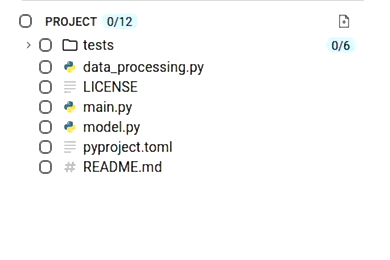
B) Baseline verification demonstrating the initial project commit hash, build environment setup, and baseline execution workflow:
- Environment setup: Installation of the uv package manager and resolution of project dependencies via
uv sync. - Test: Validation of pipeline integrity through pytest-based unit tests.
- Pipeline execution: End-to-end orchestration of the training pipeline with local dataset path as CLI argument.
2. Planning
2.1. Planning - Requirements Gathering
Regardless of whether you're a junior data scientist or a seasoned ML engineer, our planning agent provides valuable guidance when given any objective, as an instance: "Expand this email classification project".
Once the initial goal is provided, the planning agent generates its own estimate of its scope and proceeds with asking questions to make the final plan more concrete - it starts gathering information with respect to potential user (2.1.1) and technical (2.2.2) requirements. It first analyses the baseline implementation and intuitively suggests enhancement directions that align with the user's development workflow. For this use case, you can expect these to relate to model experimentation, feature engineering, hyperparameter optimisation and deployment readiness. (see below):
2.1.1. User requirements gathering questions
Here are the questions the planner asked us in this phase, and the options we selected:
Q: For the production-ready deployment, what's your target environment? - Just a simple server to stream predictions real-time (i.e. FastAPI/Flask on a single VM)
Q: For model improvements, what level of sophistication are you looking for? - Experiment and compare (i.e. try multiple algorithms, pick the best one)
Q: For enhanced text processing, what features would be most valuable? - for vectorisation strategy and feature extraction complexity, we prompted the planner to choose a feature preprocessing approach with the data types in mind - it suggested dimensionality reduction using scaling to normalise the feature distributions and satisfy statistical assumptions, as can be seen in the next phase.
 .
.
For the streamling prediction API, what format should the input be? - pre-processed features (i.e. API receives numeric feature vector (word counts already computed))
2.2.2. Techncial requirements gathering questions
After the agent finishes gathering general project implementation information, it moves on to asking techncial requirements questions, being mindful of previous context. For our project, it asked about the API framework we would like to use to return model predictions in the end. It further proceeded with asking about model comparison methods: we chose a winner-based approach (save best model), but were curious to explore its second recommendation, thereby also utilising it as an educational tool. As can be seen, the planner outlined the intended A/B testing approach and proceeded to clarifying scaling approaches for our data preprocessing stage - keeping us on track with a context-and-goal focussed implementation.
Plan creation
After the question-answering stage finishes, the planning agent provides the task sequence in order - a list of steps to achieve the primary user goal, intelligently factoring in their dependency chain. It then provides a summary of the sequence - this is the plan we obtained:
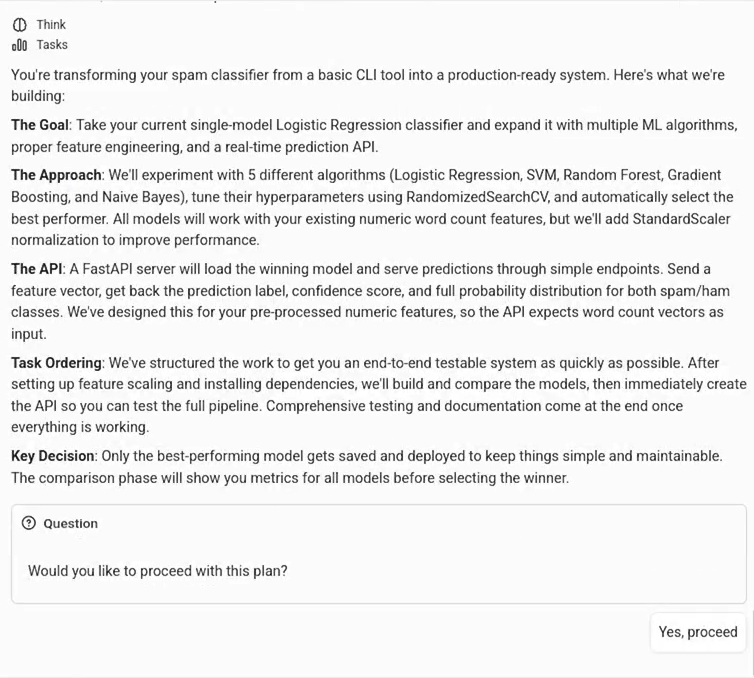
We approved the plan, as we were satisfied with the output. Once approved, the task tree is displayed as a set of tasks on the interface. Users can also choose to approve or modify the plan at any stage, even after task creation. That is, they can prompt the planning agent to add or remove tasks to be executed. The planning process can continue even after the plan has completed (replanning), at which stage the user could choose to completely or partially revisit the plan, which would prompt the agent to come up with a completely different and/or revised task tree.
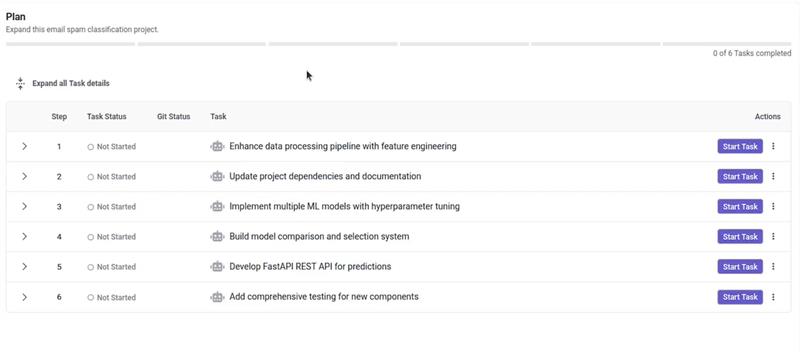
This task sequence represents a step-by-step ML project execution workflow, factoring in all the stages suggested for project expansion:
1. Feature engineering - implements feature standardization (ensuring consistent scale across all input variables).
2. Updating project dependencies and documentation - crucial for further modelling efforts.
3. ML model implementation with hyperparameter tuning - an update to our main script inclusive of our baseline linear model, combined with SVM classifier, a tree-based model (Random Forest), an ensemble model (Gradient Boosting), and a generative learning model (Naiive Bayes) - each with a suitably defined parameter configuration for tuning.
4. Model comparison and validation - post-training, model performance is assessed using the standard metrics we had applied in the beginning.
5. REST API development - for real-time inference on-demand.
6. Unit tests - the planning agent updates our unit test suite to ensure comprehensive coverage of the above-mentioned components.
Task execution
Within a plan, each task body consists of the following items:
-
Task Name - The name of the task, providing a clear identifier for the specific action or objective.
-
Task Description - The action sequence of the task, as would appear on the PR body if raised.
-
Prompt - A markdown-based instructive sequence to be consumed by a coder agent (in our case - the changeset coder).
-
Technical Specifications - A concretely defined developer blueprint.
-
Implementation Checklist - A list of sequential steps maintaining within-task execution order, as well as task scope clarity.
-
Success Criteria - A set of validation points to essentially constrain the coder to follow best practices for your ML project implementation e.g. 'Test features are transformed using training data statistics (no separate fit)' - this constraint would prevent data leakage. Success criteria in this case also informs file modifications along the plan tree, and guides the creation of further unit tests.
-
Dependencies - Informing environmental constraints, thereby preventing duplicate work.
-
Files to Read - Guide the coder's tool usage, saving resources.
-
Files to Modify - Constrain the coder's work horizon, saving resources and ensuring execution efficacy.
One can review and modify each. Then just click on 'Start Task' for the execution of the above to follow! Users can also add task via the three-dotted menu next to this button.
Code review and PR creation
Once actioned, verified and finalised, each task becomes a changeset - a (cloud-hosted and platform-managed) versionable pull request. On Artemis, we use a staged changeset review system where users can approve the diff before creating a branch and raising a Pull Request.
Crucially, users can also apply comments on their code: here we chose to additionally enable default scaling, and not leave it optional.
Final Project display
We successfully completed all implementation tasks and merged changes. The production pipeline (main.py) script trained, tuned, validated and tested every model on our dataset and saved the best by F1 score (GradientBoosting Classifier, F1=0.9632, Accuracy=0.9787, Precision=0.9664, Recall=0.9632, ROC-AUC=0.9975) in joblib format. A full trace of the final commit hash, the test log and model performance could be found below:
Artemis' planning multi-agent system successfully expanded our baseline classification pipeline into a deployable, production-grade ML system through informed task orchestration, adhering to best practices at every stage: explicit data leakage prevention via train-only scaler fitting, systematic hyperparameter tuning with grid search (not manual trial-and-error), F1-based model selection accounting for class imbalance and inference-aware REST API design, and more.
Repository
Complete source code available at github.com/turintech/spam-classification
Commits:
- Baseline: Initial logistic regression pipeline
- Final: Production system with multi-model comparison and FastAPI
Quick start:
git clone https://github.com/turintech/spam-classification
cd spam-classification
uv sync
pytest
python main.py --data-path data.csv